

What’s the best website host for my personal academic website? WordPress, Squarespace, Google Sites, and Owlstown are top recommendations from website designer for professors, Jennifer van Alstyne. WordPress.com is her favorite.
Personal websites for academics can be tricky, especially for faculty and researchers who may struggle at times to share your work.
Sharing your research online doesn’t have to be hard. Your personal academic website can do that work for you because you’ve created an infrastructure to help disseminate what’s important to you. When your website is published, it’s a great place to direct people to in person. And, helpful for people to share when you’re not in the room. On your academic personal website, people can
- Learn more about you
- Engage with your research
- Better recognize your face
- Get in touch with you
Connect with people and make your story more personable with a website. This article will help you know the best hosting for your academic website.
In this article
A beginner’s guide to personal websites

There are many kinds of personal websites academics make, like:
- A simple 1-page website
- Personal website
- Portfolio website (project-focused to highlight your work)
- Professor website (teaching-focused with students as a main audience)
- Research website (research-focused with other researchers as a main audience)
- Research project website
- Lab website
A personal website can do any, or all of these things. It’s versatile. It can grow with you over time.
Before you decide where to make your personal website, I’m going to talk about a couple website basics.
- Domain name
- Website host
The domain name, or website address is what people type into an internet search bar to find your site. The domain name is like the address of your website. For instance, the domain name for this website is TheAcademicDesigner.com. The domain name I recommend for personal websites is your name (i.e. JenniferVanAlstyne.com).
Website hosting is a service that stores your website so that people can visit it. A website host stores your website and any content you have uploaded to your site (i.e. photos).
This article talks about the best place to build your website for academics.
Where should I host my personal website?
There are so many ways to host your personal website. This article covers my top recommendations, including
- WordPress (managed like WordPress.com, or self-hosted on a service like Reclaim Hosting)
- Squarespace
- Google Sites
- Owlstown
These are some of the best hosting sites for personal websites.

WordPress is great for academic personal websites
WordPress is a free content management system you can use to make your website. WordPress not a website host. It’s a set of programs which allow you to make and publish digital content. Since it’s open-source, anyone can download it and use it to create a website. WordPress makes it easy to add content, images, and video in no time.
A website host is what you use to house a WordPress website.
Many academics self-host their WordPress website with a service like Reclaim Hosting. When I asked on Twitter, “what website host do you use?” there was a lot of passion for this one.
Reclaim Hosting has several options good for professors, like the shared hosting Professional Plan $50/year USD. Your own domain name is an additional $15/year.
This is what I use as well. I’ll add that reclaim’s customer service is so good—they’ve helped me troubleshoot student issues in the past
— kristen baldwin deathridge (@k10death) September 22, 2021
WordPress on Reclaim Hosting. Came out of the Domain of One’s Own movement. No complaints so far. All pretty straightforward.
— Andreas B🦨😷scheid (@broscheid) September 22, 2021
Reclaim Hosting is specifically for students and faculty. If you move-on from academia it’s not your best option long-term.
Self-hosting your website, even with a great hosting service like Reclaim Hosting, isn’t the best option for most people.
If you don’t have technical skills or website experience, a managed WordPress host is best for you.
My top recommendation: managed WordPress host, WordPress.com
Managed WordPress hosts give you everything you need for your personal website, with added benefits like
- Customer service
- Security (keeps you safe from hackers, malware)
- Monitors your website (and alerts you if it ever goes down)
- Technical updates
The managed WordPress host, WordPress.com is my #1 recommendation for website hosts. They have great customer service in case you have a question. I’ve used them for years! They’ve helped me troubleshoot issues and find the information I need.
In 2022, my website went down and I panicked. I was anxious because I didn’t know what was wrong with my website. I thought, ‘Did I do something wrong?’ Or worse, ‘Are people visiting my site going to get malware or viruses?’ The uncertainty of not knowing what’s wrong or if I made a mistake was eating at me. I had to figure this out.
Luckily, WordPress.com customer service came to the rescue. They’re responsive and give you peace of mind. I got the issue fixed in 2 hours with the help of their customer service team!
I’ve heard from clients and other colleagues that customer service on Wix is not so great, but they will resolve your issue. Squarespace (if you do a quick Google search) has terrible customer service with slow response times. Please be cautious and make sure you pick the right website host for you.
Your best option if you have a budget for a website, is their Personal ($4/month) or Premium ($8/month) plans. A domain name is an additional $18/year USD. Choose the Premium plan if you want more control over the look and feel of your website. You’ll get more customization options.
WordPress.com is the best free option personal website. You won’t get your own domain name, but that’s OK. You’ll get a WordPress.com subdomain with every website you make with them (the subdomain for my personal website is JenniferVanAlstyne.WordPress.com).
A question I get asked a lot is, “Isn’t a subdomain unprofessional?” No, not really. While people may prefer YourName.com, it isn’t necessary for people to engage with your website. If you have the budget for it, getting your own domain name is preferred (people will have to remember less when looking for your website).
WordPress.com is great if you want to start a blog, or for adding research projects and publications to your personal website. They make it easy to store a lot of content. It’s perfect for academics and researchers who have a lot to say and showcase on their website pages. If you think you may want a blog in the future, this is your best option.
WordPress.com isn’t the only managed WordPress host, but it’s my favorite. It’s what I use for this website. I use it for my personal website. It’s what I recommend most to my website strategy clients.
If you shop around for other WordPress hosting options, look for “managed hosting.”
Squarespace
Squarespace is another website builder. This website hosting company is popular for ecommerce sites, people selling products. Many people also use it for personal sites. The templates and website builder, or backend system, is comparable to WordPress.
Personal websites on Squarespace start at $12/month.
Squarespace brings some great benefits like
- Customer service
- Security (keeps you safe from hackers, malware)
- Unlimited bandwidth and storage
I like how polished & professional the SS sites look. Pretty easy to learn and use as well.
— Natka Bianchini (@DocBianchini) September 22, 2021
I don’t recommend Squarespace for those looking to start a blog or have a larger research website because it can be a bit clunky if you have a lot of content.
Google Sites
Google Sites is a free web building platform by Google. You need a Google Account to create one. It has basic templates for small, personal websites. It doesn’t have the selection of theme and design options from WordPress or Squarespace. Start by getting your domain name.
Yes it’s very intuitive. The flipside is that the options for customization seem limited, but maybe there are hidden features I haven’t found yet.
— Simon van Baal (@SimonvBaal) September 22, 2021
Google Sites is great if you want a simple website, or even a 1-page website. It is also a good option if you’re looking to highlight an individual research project.
People who use this tend to want something easy, and don’t plan on a more extensive website in the future. If so, you may need to migrate your website to a new host. Don’t worry, many website hosts offer migration services for free.
Owlstown
If you don’t know where to start, avoid the hassle of sifting through many design templates in WordPress or Squarepace. Turn to Owlstown. This is a website host and builder specifically for academics created by Ian Li, PhD.
Ian started over a decade ago creating his own website in grad school, believing this was a great way to share his work and research. Owlstown began as a hobby in 2018 that grew into a business helping others create websites to share their research.
Today, the mission for him and his company is simple: make it super easy for academics to create a website. I love collaborating on our Best Personal Academics Websites Contest we do each year.
Owlstown offers a limited selection of pre-selected website templates. All you have to do choose one. Then, add in your content and media.
Owlstown is an option academics like a lot because of the customer service. I like their Pro Premium plan ($96/year USD) because you can connect a custom domain name (website URL). That will allow you to name your website exactly what you want and make it easy for people to find.
Super simple. The few times I had questions Ian @owlstown was very kind and walked me they it via email. When I had trouble figuring out how to add the trailer for the documentary I co-wrote on my website, he was kind enough to do it for me.
— Dr. Rachel Michelle Gunter (@PhdRachel) September 22, 2021
Avoid these website builders

These website builders, despite being easy to use, may create more issues for you in the long term. Although you might be happy at first, these website builders can cause headaches down the road.
- Drag-and-drop website builders
- Any self-hosted website when you don’t have time/technical skills to manage it
No drag-and-drop website builders (Wix.com and Weebly)
Drag-and-drop website builders are not great because their functionality can be difficult to navigate. These websites will have more design decisions for you to make. If you have a lot of pages on your website, it can be glitchy. Or, slow to load.
My friend Brittany Trinh wrote about Why I Don’t Recommend Github, Wix, and Weebly. We had a great chat about website hosts.
Wix is a mediocre website builder for my clients. Why? Every person and research group I work with needs to be able to update their website content. They say Wix is easy to build, but hard to keep updated. It’s not particularly easy to manage once you have a website, and because of that, I don’t recommend Wix for professors.
The Content Management System (CMS) for Wix where people make changes to a website can be difficult to learn and use. My clients who used Wix in the past found it can be slow or delayed when implementing changes, especially with larger websites. If you have an issue or glitch with Wix, it may be difficult to resolve.
Listen to the new 2025 interview with Brittany Trinh.
These websites are also bad for accessibility. This makes it harder for some website visitors to read or explore your site. This can end up being bad for search engine optimization (SEO). Though, my YouTube live guest, Patrick Wareing says these website builders aren’t quite as bad for SEO as I worried.
Drag-and-drop website builders are especially difficult to migrate. So if you want to leave this website host for another, you may end up losing your data. Or, having to copy and paste all the text manually.
If you haven’t started your website on a drag-and-drop website editor, I highly recommend WordPress over these options. WordPress is easier to learn than you might think.
If you don’t have the time or skills for a self-hosted website, don’t do it!
People sometimes think that free/low-cost is the best option when you’re on a budget. But your time is valuable. If you don’t have the
- Time
- Skills
to manage a self-hosted website, don’t do it! Choosing this sets you on a path for aggravation.
It’s more work. And security can be an issue. That’s why I recommend a website host that has
- Customer service
- Security for your website
- Updates
Check out other ways people are hosting their personal websites in this tweet thread.
Best website alternative: LinkedIn
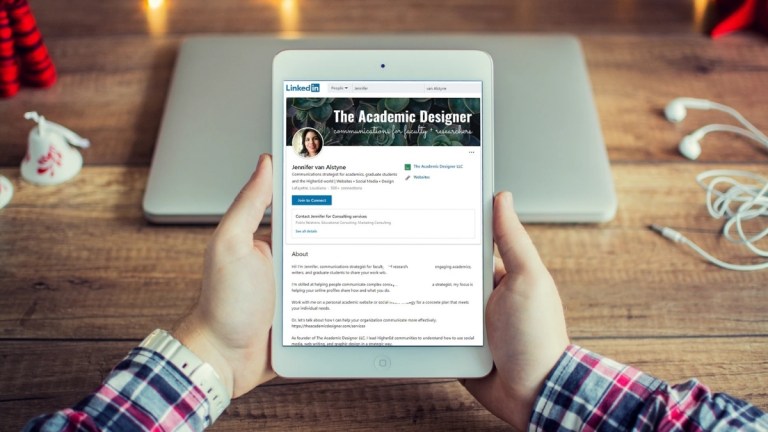
A fantastic alternative to a personal website is a LinkedIn profile. Many people have LinkedIn profiles, but they don’t update or check on them that often. Some academics think of LinkedIn as a space for business professionals, but this is not true.
LinkedIn provides all the info you need to share who you are and what you do without needing the extra steps of starting up a personal website. LinkedIn profiles tend to be ranked highly in Google, especially if you have a filled out profile.
I have had a lot of success with clients introducing themselves on LinkedIn, and finding connections that carry on meaningful conversations. I even have a masterclass to help you make an awesome LinkedIn profile!
3 choices to make about your website before choosing where to host it

Before you decide on your website host or if you want a personal website at all, ask yourself some questions to know what you want.
- How big do you want your website to be?
- Do you want to blog about your research?
- How much time do you have for your website?
These questions will help you determine
- what you’re going to use your personal website for
- what you want to share on your website
Here are 35 ideas for pages for your personal academic website for professors and researchers.
I’d love to help with your academic website

Let’s talk about your website project. While there’s free resources to help you make your own personal academic website on The Social Academic blog, you don’t have to do it alone. Schedule a no pressure Zoom call to chat about working with me on your website project as an academic.
Thanks for checking out this article! If you found it helpful, please share it with your friends or on social media.
