

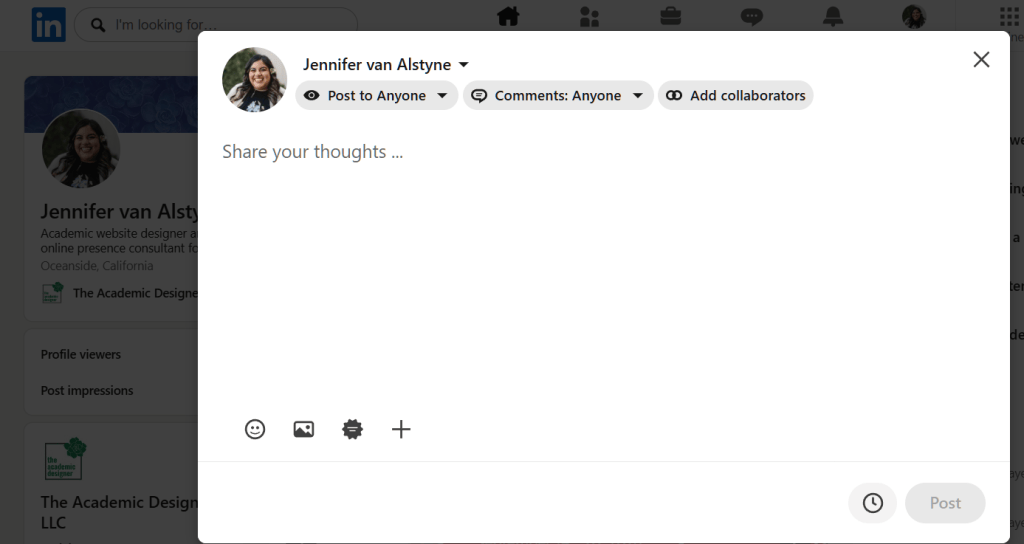
Yay! I’ve finally got access to collaborative posts on LinkedIn. I love this for my academic clients. Do you have access to this feature on your LinkedIn posts yet?
Subscribe to The Social Academic blog.
The form above subscribes you to new posts published on The Social Academic blog.
Want emails from Jennifer on building your online presence? Subscribe to her email list.
Looking for the podcast? Subscribe on Spotify.
Prefer to watch videos? Subscribe on YouTube.
LinkedIn Collaborator Ideas
Here’s a few ideas for adding collaborators to posts for professors and researchers
For Publications
Books, edited collections, and article publications
- Publisher / Press
- Co-authors
- Contributors
For Conferences, Talks, and Events
- Panelists
- Event host
- Moderator for your talk
- Organizations / Scholarly Associations
- Event co-host or guest (if you’re organizing)
Labs and Research Groups
- Principal Investigator or lab director (if posting from the Lab’s LinkedIn page)
- LinkedIn page for your lab / group (if you have one)
- LinkedIn page for your research center (if associated with a larger center or institution)
- A sub team or focus group (such as for a particular project)
- A particular student or group member
- Your university (especially when sharing big research news)
- Research funders
- Research collaborators or partners
Collaborate vs. Tag
Collaborate
Collaborating is great when you’d like the post to appear on each of your profiles. You can add up to 5 collaborators to a LinkedIn post.
What is a collaborative post on LinkedIn? View LinkedIn’s guide.
Tags (Mentions)
Tagging is better when mentioning a larger number of people. A mix of adding collaborators to the post + tags in the post text may be helpful for you.
P.S. I’m calling it ‘tagging’ here because that’s the term people tend to use across social media platforms for the action of mentioning a person in their post (typically with the @ symbol before their name). On LinkedIn, this is officially called a “Mention” instead.
Want to mention a person or page in your LinkedIn post? View LinkedIn’s guide.
Visibility of Mentions and Tags on LinkedIn
I’ve tagged a lot of people on LinkedIn. And I’ve helped faculty around the world better understand how mentions, tags, and collaborations are meaningful to the people they care about as part of our work on their social media and online presence.
Some people don’t want to be tagged on social media.
Some people do want to be tagged, and may not realize they’ve blocked people from tagging you. That was true for my close friend, Brittany Trinh! I went to tag her in a LinkedIn post about our Best Personal Academic Websites Contest and it said I wasn’t allowed. The first few times that happened, I was like “Oh, Brittany doesn’t want to be mentioned on LinkedIn.” But when we were catching up one time, I was like, “Your tags are turned off.” She was surprised! It was unintentional. She did want to be tagged and was happy she could adjust those settings.
Most people aren’t checking their LinkedIn settings on a regular basis. So here’s LInkedIn’s guide to help you choose whether people can tag, mention, and invite you to collaborate with them.
Yay! When in doubt, it doesn’t hurt to ask people if they’re open to being tagged.
Happy posting! 🫶
Sign up
Get an email to your inbox when new posts are published.
Next on The Social Academic: Max Bai, PhD joins me to talk about The Publish or Perish Game. Then, Lisa Munro, PhD returns to the podcast to chat about public scholarship. A medical emergency prevented her from attending her TEDx audition, but didn’t stop her from sharing about it online!
Subscribe to The Social Academic blog.
The form above subscribes you to new posts published on The Social Academic blog.
Want emails from Jennifer on building your online presence? Subscribe to her email list.
Looking for the podcast? Subscribe on Spotify.
Prefer to watch videos? Subscribe on YouTube.
